Okay, here goes ...
The basic component of a tatting diagram is the ring. The most basic shape would be an oval, but we all know that the ring is not really a circle nor is it an oval. It most cases it is slightly pointy as the one shown on the right. Your can play around with your drawing until you get that shape of ring that you are happy with, and save it.

Basically, that is the only shape that you need to pay attention to at the beginning. This one shape can be enlarged, reduced, group, ungroup, rotated, flipped or copied how many number of times that you need to finish the drawing.
From this one shape, you can derive the
Trefoil or clover-leaf,

The daisy or flower shape,

or the 4-rings square

And you can position them anyway you like such as,


Once you have all these shapes drawn, save each one of them. They are now templates of the basic tatting designs that can be used on its own or as a group to form a bigger design. You just need to pull up any one of these templates and save the trouble of drawing it from the start all over again.
What I do is save all these templates as a file named 'template' (what else). Each time I want to start a new design, I open this template file and then "save as" a new file of the design that I am going to work on.
An example is this beginning of a motif made up of a trefoil, copied six times and rotated in increments of 60 degrees to form a circular arrangement,

or this round medallion which is really a ring copied 10 times and rotated at 36 deg,

Let us try and design something by using only half of the 10-rings medallion shape shown above, like this

Now, let us play around with this 5-rings curved design together with the 4-rings square. Copy, paste and rotate the 5-rings curve by 45 deg, and arrange it around the 4-ring square to get something like this design,

Copy and paste this four times, and you will get another layout of rings.

Now, let us remove some parts of this latest diagram and see what we get. I have removed the outlying rings and only kept the ones in the middle and kept two rings out of the 4-rings square in each corner. Then I fill up the blank space in the middle with the 4-rings square.
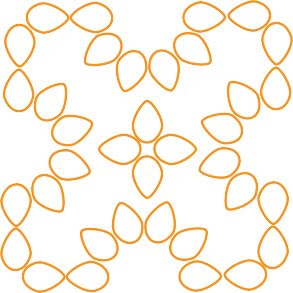
I reduced the size of the 4-rings square to bring the whole look into proportion. Next is to add in the chains. Looking good! I can see a tat-able square motif taking shape.

Copy and paste this a few times to see a bigger picture, and we have designed a square mat.


